JButton in java (How we create JButton in java Swing)

Java Button
The JButton class is used to create a categorized button that has platform independent implementation. The utility bring about a few movement when the button is driven. It inherits AbstractButton class.
Creating Button:
JButton btn1 = new JButton("ok");
        btn1.setBounds(50,100,95,30);
        add(btn1);
Commonly used Methods of AbstractButton class:
Methods Description
|============================================
|void setText(String s) || it's miles used to set specific text on button
|==================================================================
|String getText() || it's far used to go back the text of the button.
|==================================================================
|void setEnabled(boolean b) || it's miles used to permit or disable the button.
==================================================================
|void setIcon(Icon b) || it is used to set the required Icon at the button.
==================================================================
| Icon getIcon() || it's miles used to get the Icon of the button.
|==================================================================
|void setMnemonic(int a) || it's far used to set the mnemonic on the button.
|==================================================================
|void addActionListener(ActionListener a) || it is used to feature the action listener to this
object . ===================================================================
JButton Example:
Import javax.swing.*;

public class Button1 {

    public static void main(String[] args) {

        JFrame f = new JFrame("My First GUI Frame");
        JButton btn1 = new JButton("ok");
        btn1.setBounds(50,100,95,30);
        f.add(btn1);

        f.setSize(400, 400);
        f.setLayout(null);
        f.setVisible(true);

    }

}
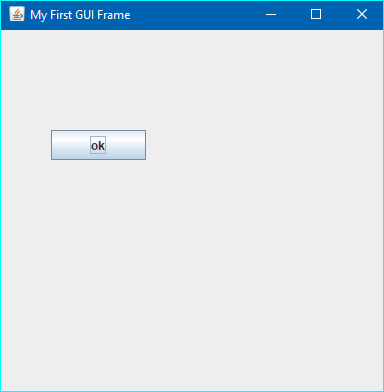
Output:

JButton Example with the Help of OPP Concept Constructor
import javax.swing.*;

public class Button1 {

    public static void main(String[] args) {

        new Button1();
    }

    public Button1()
    {
        JFrame f = new JFrame("My First GUI Frame");
        JButton btn1 = new JButton("ok");
        btn1.setBounds(50,100,95,30);
        f.add(btn1);

        f.setSize(400, 400);
        f.setLayout(null);
        f.setVisible(true);
    }

}
Output:
Watch Video:


